|
Note
|
This is part 1 of a build-in-public series on an e-commerce microservices platform. I follow the book Microservices with Spring Boot 3 and Spring Cloud (3rd edition, Magnus Larsson), but replace its example with a shop that has a cart, inventory, orders and payments. Every post has a git tag ( |
I want to learn how to build a system that can scale, the kind of learning where you can actually do it afterwards. Reading a book and closing it means forgetting it quickly, so this time I am building a real project alongside each chapter and writing down every step. This series is that notebook.
By the end of this post you will have:
-
The big picture of the system we build across the series.
-
A machine with all the tools installed.
-
A Gradle multi-project build that compiles, with two shared modules:
apiandutil.
Why microservices?
Honestly, a small shop is fine as a monolith, and that is usually the right choice. I picked microservices because the goal of this project is to learn how to build a system that can scale, and e-commerce is a great fit for that:
-
Load is uneven across the system. The product pages can get a hundred times more requests than checkout. Split them apart and you can scale the catalog on its own.
-
Failures do not spread. If the recommendation service goes down, customers must still be able to browse and buy.
-
Ordering is asynchronous by nature. Create the order, reserve stock, charge the card, send the email: a chain of steps that can fail halfway, which makes it ideal for learning event-driven design and sagas.
The price is complexity: service discovery, a gateway, security between services, tracing, centralized logging. That is exactly what the book, and this series, are about.
What the system will look like
The book builds four services: product, review, recommendation and product-composite (which aggregates the other three). That is really the product detail page of a shop, so I keep them and add the services needed to buy things:
| Service | Role | Database |
|---|---|---|
|
Catalog: products and prices |
MongoDB |
|
Product reviews |
MySQL |
|
Product recommendations |
MongoDB |
|
API for the product page |
none |
|
Stock and reservations |
MySQL |
|
Orders |
MySQL |
|
Payments (simulated) |
none |
Around them sits the Spring Cloud infrastructure: Eureka (service discovery), Spring Cloud Gateway (the single entry point), Spring Authorization Server (OAuth2), and Kafka so services can talk to each other through events.
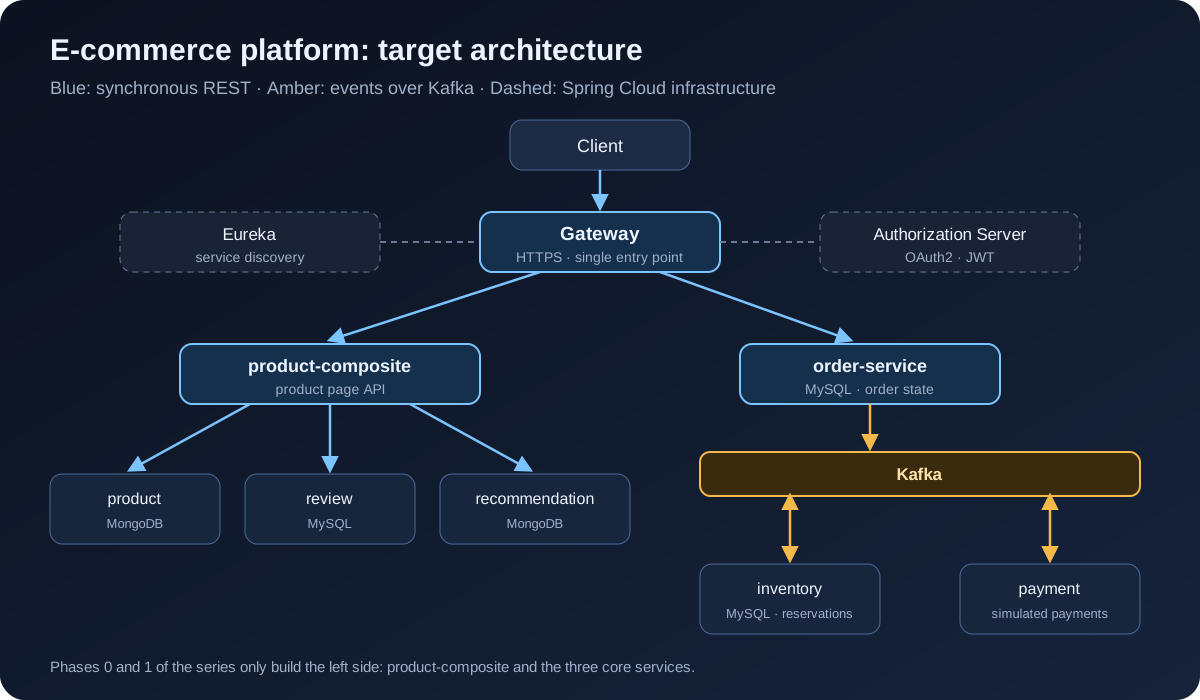
The order flow will work like this:
-
order-servicecreates the order inPENDINGstate and publishes an event to Kafka. -
inventory-servicereserves the stock and answersRESERVEDorREJECTED. -
payment-servicecharges the customer and answersCOMPLETEDorFAILED. -
order-servicemoves the order toCONFIRMEDorCANCELLED; on failure, the stock is released.
The series has four parts:
-
Foundations (posts 1 to 5): the first service, calls between services, Docker, API documentation.
-
Data and events (posts 6 to 10): MongoDB, MySQL, reactive, Kafka, the order saga.
-
Spring Cloud (posts 11 to 16): Eureka, Gateway, OAuth2, Config Server, Resilience4j, tracing.
-
Kubernetes and operations (post 17 onwards): Helm, autoscaling, Istio, logging and monitoring.
The stack, and where I differ from the book
The book targets Java 17, Spring Boot 3.0 and Spring Cloud 2022. Those versions are out of support, so I use newer ones. The APIs are almost unchanged, so you can still read the book side by side.
| Component | Book | This series |
|---|---|---|
Java |
17 |
21 (LTS) |
Spring Boot |
3.0.x |
3.5.x |
Spring Cloud |
2022.0.x |
2025.0.x |
Build |
Gradle |
Gradle 8.14 |
Message broker |
RabbitMQ and Kafka |
Kafka (KRaft mode, no Zookeeper) |
Whenever the code differs from the book because of a newer version, I call it out right there.
Installing the tools
This post only needs a JDK and Git. Docker is needed from post 4, but you might as well install it now:
| Tool | Used for | Check |
|---|---|---|
JDK 21 (Temurin) |
Building and running the services |
|
Git |
Version control |
|
Docker Desktop or Docker Engine |
Running the system with Docker Compose |
|
|
Testing the APIs from scripts |
|
IntelliJ IDEA or VS Code |
Writing code |
On macOS I use Homebrew and SDKMAN:
brew install git jq
brew install --cask docker
curl -s "https://get.sdkman.io" | bash
sdk install java 21-tem
On Windows, the book (chapter 22) recommends WSL2 + Ubuntu and then installing everything as on Linux. I recommend the same, because every bash script in this series runs in WSL2 without changes.
You do not need to install Gradle: the project uses the Gradle Wrapper (./gradlew), which downloads the right version for you.
The Gradle multi-project skeleton
Each microservice is its own Spring Boot application. But to learn and run everything on one machine, the book puts them all in one Gradle multi-project repository: one build, while the services stay independent at runtime. By the end of the series the layout looks like this:
ecommerce-platform/
├── api/                  # shared REST interfaces, DTOs, events
├── util/                 # global error handling, utilities
├── microservices/        # business services (from post 2)
├── spring-cloud/         # eureka, gateway, authorization-server (from post 11)
├── build.gradle
├── settings.gradle
└── gradlew
Create the folders and the Gradle Wrapper
mkdir ecommerce-platform && cd ecommerce-platform
git init
gradle wrapper --gradle-version 8.14.3   # needs Gradle installed, this one time only
mkdir -p api/src/main/java/com/ecommerce/api util/src/main/java/com/ecommerce/util|
Tip
|
If you do not want to install Gradle, generate a project on start.spring.io (pick Gradle - Groovy) and copy |
settings.gradle: declaring the modules
rootProject.name = 'ecommerce-platform'

include ':api'
include ':util'
Each following post adds an include line, for example include ':microservices:product-service' in post 2.
The root build.gradle: shared configuration in one place
This is where I differ slightly from the book. The book lets every module declare its own plugins and versions. I moved the repeated parts into the root file, so upgrading Spring Boot later means changing one line:
import org.springframework.boot.gradle.plugin.SpringBootPlugin

plugins {
    id 'org.springframework.boot' version '3.5.16' apply false // (1)
    id 'io.spring.dependency-management' version '1.1.7' apply false
}

ext {
    springCloudVersion = '2025.0.3'
    springdocVersion = '2.8.17'
    mapstructVersion = '1.6.3'
}

subprojects {
    // Grouping folders (microservices, spring-cloud) are not Java projects
    if (project.buildFile.exists() == false) return // (2)

    apply plugin: 'java'
    apply plugin: 'io.spring.dependency-management'

    group = 'com.ecommerce'
    version = '1.0.0-SNAPSHOT'

    java {
        toolchain {
            languageVersion = JavaLanguageVersion.of(21) // (3)
        }
    }

    repositories {
        mavenCentral()
    }

    dependencyManagement {
        imports { // (4)
            mavenBom SpringBootPlugin.BOM_COORDINATES
            mavenBom "org.springframework.cloud:spring-cloud-dependencies:${springCloudVersion}"
        }
    }

    tasks.withType(JavaCompile).configureEach {
        options.compilerArgs += ['-parameters'] // (5)
    }

    tasks.withType(Test).configureEach {
        useJUnitPlatform()
    }
}-
apply false: the Spring Boot plugin is resolved but not applied to any module yet. Only runnable servicesapply plugin: 'org.springframework.boot'. Library modules such asapiandutildo not, because the plugin packages a module as a fat jar, which a library does not need. -
Skip folders that only group other projects, such as
microservices/. -
Gradle uses JDK 21 even if your machine’s default JDK is a different version.
-
The Spring Boot and Spring Cloud BOMs: dependencies need no version numbers, and the libraries are always compatible with each other.
-
Keep parameter names when compiling, so Spring can read
@PathVariable int productIdwithout writing@PathVariable("productId").
The api module: the contract between services
api holds what services must agree on: REST interfaces, DTOs, and later on, events. In post 3, the composite service shares the ProductService interface with product-service, so the two sides cannot drift apart.
plugins {
    id 'java-library'
}

dependencies {
    api 'org.springframework.boot:spring-boot-starter-webflux'
    api "org.springdoc:springdoc-openapi-starter-common:${springdocVersion}"
    api 'com.fasterxml.jackson.datatype:jackson-datatype-jsr310'
}
The java-library plugin and the api configuration (instead of implementation) make these libraries visible to every module that depends on api. The book uses WebFlux from chapter 3, and so do I. springdoc-openapi-starter-common only contains the documentation annotations, which we use in post 5.
The first DTO, written as a Java record:
package com.ecommerce.api.core.product;

import java.math.BigDecimal;

public record Product(int productId, String name, BigDecimal price, String serviceAddress) {
}
The book uses classes with getters and setters; records are shorter, immutable, and fully supported by Jackson. I added price as a BigDecimal because this is a shop: never use double for money. The serviceAddress field tells you which instance answered the request, which becomes very useful once we scale out in the Spring Cloud part.
The REST interface:
package com.ecommerce.api.core.product;

import org.springframework.web.bind.annotation.GetMapping;
import org.springframework.web.bind.annotation.PathVariable;
import reactor.core.publisher.Mono;

public interface ProductService {

    @GetMapping(value = "/product/{productId}", produces = "application/json")
    Mono<Product> getProduct(@PathVariable int productId);
}
The @GetMapping annotation sits on the interface itself, so in post 2 a controller only has to implements ProductService to get the endpoint. Mono<Product> means "one product, available at some point in the future"; that is enough for now, post 2 goes deeper.
Finally, the shared exceptions in the com.ecommerce.api.exceptions package:
package com.ecommerce.api.exceptions;

public class NotFoundException extends RuntimeException {

    public NotFoundException(String message) {
        super(message);
    }

    public NotFoundException(String message, Throwable cause) {
        super(message, cause);
    }
}
Create InvalidInputException (business-level invalid input, such as a negative id) and BadRequestException the same way.
The util module: error handling once, for every service
plugins {
    id 'java-library'
}

dependencies {
    api project(':api')
}
Instead of letting every service catch exceptions and return error JSON in its own format, we write one shared @RestControllerAdvice. First, the error format:
package com.ecommerce.util.http;

import java.time.ZonedDateTime;
import org.springframework.http.HttpStatus;

public record HttpErrorInfo(ZonedDateTime timestamp, String path, HttpStatus httpStatus, String message) {

    public HttpErrorInfo(HttpStatus httpStatus, String path, String message) {
        this(ZonedDateTime.now(), path, httpStatus, message);
    }
}
Then the handler, which maps each exception to an HTTP status:
package com.ecommerce.util.http;

import static org.springframework.http.HttpStatus.BAD_REQUEST;
import static org.springframework.http.HttpStatus.NOT_FOUND;
import static org.springframework.http.HttpStatus.UNPROCESSABLE_ENTITY;

import com.ecommerce.api.exceptions.BadRequestException;
import com.ecommerce.api.exceptions.InvalidInputException;
import com.ecommerce.api.exceptions.NotFoundException;
import org.slf4j.Logger;
import org.slf4j.LoggerFactory;
import org.springframework.http.HttpStatus;
import org.springframework.http.server.reactive.ServerHttpRequest;
import org.springframework.web.bind.annotation.ExceptionHandler;
import org.springframework.web.bind.annotation.ResponseStatus;
import org.springframework.web.bind.annotation.RestControllerAdvice;

@RestControllerAdvice
class GlobalControllerExceptionHandler {

    private static final Logger LOG = LoggerFactory.getLogger(GlobalControllerExceptionHandler.class);

    @ResponseStatus(BAD_REQUEST)
    @ExceptionHandler(BadRequestException.class)
    public HttpErrorInfo handleBadRequestExceptions(ServerHttpRequest request, BadRequestException ex) {
        return createHttpErrorInfo(BAD_REQUEST, request, ex);
    }

    @ResponseStatus(NOT_FOUND)
    @ExceptionHandler(NotFoundException.class)
    public HttpErrorInfo handleNotFoundExceptions(ServerHttpRequest request, NotFoundException ex) {
        return createHttpErrorInfo(NOT_FOUND, request, ex);
    }

    @ResponseStatus(UNPROCESSABLE_ENTITY)
    @ExceptionHandler(InvalidInputException.class)
    public HttpErrorInfo handleInvalidInputException(ServerHttpRequest request, InvalidInputException ex) {
        return createHttpErrorInfo(UNPROCESSABLE_ENTITY, request, ex);
    }

    private HttpErrorInfo createHttpErrorInfo(HttpStatus httpStatus, ServerHttpRequest request, Exception ex) {
        final String path = request.getPath().pathWithinApplication().value();
        final String message = ex.getMessage();
        LOG.debug("Returning HTTP status: {} for path: {}, message: {}", httpStatus, path, message);
        return new HttpErrorInfo(httpStatus, path, message);
    }
}
With that in place, any service just needs to throw new NotFoundException("No product found for productId: 13") and the client always gets the same format:
{
  "timestamp": "2026-10-02T05:57:56.405471652Z",
  "path": "/product/13",
  "httpStatus": "NOT_FOUND",
  "message": "No product found for productId: 13"
}|
Note
|
This class lives in the |
Last, the .gitignore:
.gradle/
build/
!gradle/wrapper/gradle-wrapper.jar
.idea/
*.iml
.vscode/
out/
bin/
.DS_Store
Checking the result
./gradlew buildYou should see BUILD SUCCESSFUL. No service runs yet, but the foundation is in place: one place to manage versions, a shared API contract, and consistent error handling. Commit it:
git add .
git commit -m "Post 1: Gradle multi-project skeleton with api and util modules"
git tag blog-01
Summary
-
We know what we are building: seven business services, Eureka, Gateway, an Authorization Server and Kafka.
-
The Gradle multi-project build is set up, with shared configuration in the root file.
-
The
apimodule holds records, REST interfaces and exceptions;utilholds the global error handling.
In part 2, I create the first service, product-service: a controller written from the interface in api, tried out with curl and tested with WebTestClient.