|
Note
|
This is part 8 of the e-commerce microservices series, part 2 (data and events). The code for this post is at tag |
In post 6, the composite created a product by calling product, recommendation and review over REST in parallel. If review-service happened to be down at that moment, the product got created, the reviews were lost, and the client received a 500 even though half the work was done.
This post changes how data is written: the composite no longer calls REST, it sends events to Kafka and answers right away. Each core service reads its own events and processes them when it is ready. Reads stay as they were, over REST.
By the end of this post you will have:
-
Kafka running in Docker Compose in KRaft mode, without ZooKeeper.
-
POSTandDELETEon the composite returning202 Acceptedand sending events to four topics. -
product, recommendation, review and inventory consuming events through Spring Cloud Stream.
-
An experiment: stop review-service, create a product, start it again, and the reviews still show up.
Why write with events
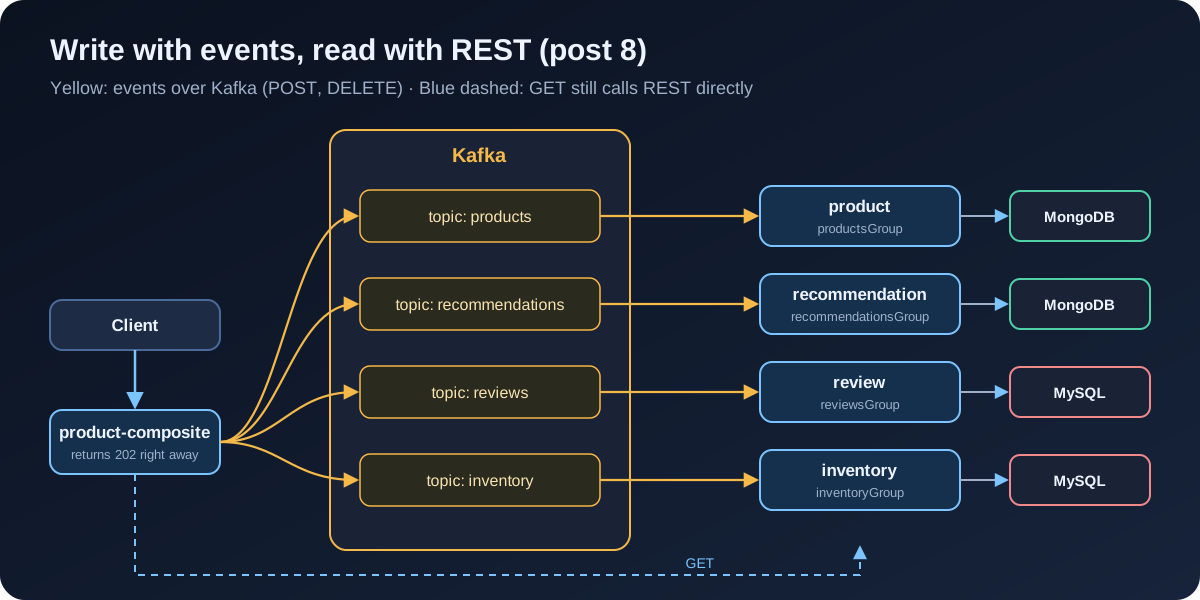
With REST, the composite has to wait for all four services, and a single failing service fails the whole request. With events:
-
The composite is done once Kafka has accepted the event. It does not need to know which services are running.
-
Kafka keeps the events. A service that is down picks up where it left off when it comes back.
-
If a new service also wants to know about new products, it just reads the same topic; the composite does not change.
The price is eventual consistency: right after the 202, the data may not be in the core services yet. Clients have to accept that, and so do our tests.
Reads are different. A product page needs its data now, so GET still calls REST. The book calls this split asynchronous writes and synchronous reads.
Spring Cloud Stream
We do not use the Kafka client library directly. Spring Cloud Stream lets you write code that sends and receives messages without tying it to a specific broker. Three concepts to know:
-
Binder: the part that talks to the real broker. Here, the Kafka binder.
-
Binding: a named input or output, for example
products-out-0ormessageProcessor-in-0. -
Destination: the topic a binding points to, set in configuration.
The code only knows binding names; which topic and which broker a binding points to is up to the configuration file.
Add the dependencies to the composite and the four core services:
implementation 'org.springframework.cloud:spring-cloud-starter-stream-kafka'
testImplementation 'org.springframework.cloud:spring-cloud-stream-test-binder'
Versions come from the Spring Cloud BOM 2025.0.3, declared in the root build.gradle since post 1. The test binder is a fake in-memory binder, used in tests so we do not need a running Kafka.
The event
Every event has the same shape, placed in the api module so the sending and receiving sides share it:
/**
 * Shared event for creating and deleting data in the core services.
 * key is the productId, data is the object to create (null for DELETE).
 */
public record Event<K, T>(
    Type eventType,
    K key,
    T data,
    @JsonFormat(shape = JsonFormat.Shape.STRING) ZonedDateTime eventCreatedAt) {

    public enum Type {
        CREATE,
        DELETE
    }

    public Event(Type eventType, K key, T data) {
        this(eventType, key, data, ZonedDateTime.now());
    }
}
@JsonFormat writes the creation time as a readable ISO-8601 string instead of a number.
The composite sends events
ProductCompositeIntegration keeps its GET methods on WebClient. The create and delete methods now send events through StreamBridge:
@Override
public Mono<Product> createProduct(Product body) {
    return Mono.fromCallable(() -> {
        sendMessage("products-out-0", new Event<>(Event.Type.CREATE, body.productId(), body));
        return body;
    }).subscribeOn(publishEventScheduler);
}

@Override
public Mono<Void> deleteProduct(int productId) {
    return Mono.fromRunnable(() -> sendMessage("products-out-0", new Event<>(Event.Type.DELETE, productId, null)))
        .subscribeOn(publishEventScheduler).then();
}

/** Send the event through StreamBridge; the binding name decides the topic (see application.yml). */
private void sendMessage(String bindingName, Event<Integer, ?> event) {
    LOG.debug("Sending a {} message to {}", event.eventType(), bindingName);
    streamBridge.send(bindingName, event);
}
Recommendation, review and inventory look exactly the same with their own binding names: recommendations-out-0, reviews-out-0, inventory-out-0.
streamBridge.send() is a blocking call: the first time it sends to a topic, the Kafka producer has to wait for metadata from the broker. So we reuse the trick from post 6 and run it on its own thread pool:
/**
 * StreamBridge.send() can block (waiting for metadata from Kafka), so run it on its own thread pool
 * instead of the WebFlux event loop, the same way review-service runs JPA in post 6.
 */
@Bean
public Scheduler publishEventScheduler(
        @Value("${app.threadPoolSize:10}") Integer threadPoolSize,
        @Value("${app.taskQueueSize:100}") Integer taskQueueSize) {
    return Schedulers.newBoundedElastic(threadPoolSize, taskQueueSize, "publish-pool");
}
Binding names are mapped to topics in the composite’s application.yml:
spring.cloud.stream:
  defaultBinder: kafka
  default.contentType: application/json
  bindings:
    products-out-0.destination: products
    recommendations-out-0.destination: recommendations
    reviews-out-0.destination: reviews
    inventory-out-0.destination: inventory
  kafka.binder.brokers: localhost:9092
The docker profile switches the broker to kafka:9092.
ProductCompositeServiceImpl barely changes: it still calls integration.createProduct(…) and the others, then waits with Mono.when. The difference is that "done" now means the events were sent, not that the data was stored. The interface in the api module tells the client so:
@ResponseStatus(HttpStatus.ACCEPTED)
@PostMapping(value = "/product-composite", consumes = "application/json")
Mono<Void> createProduct(@RequestBody ProductAggregate body);
DELETE /product-composite/{productId} returns 202 Accepted too. 202 means "request received, will be processed later", unlike 200 "done".
One consequence: errors that happen after the event is sent, such as a duplicate productId, can no longer reach the client. Anything that can be checked right away should be checked in the composite, before sending:
if (body.productId() < 1) {
    throw new InvalidInputException("Invalid productId: " + body.productId());
}
Core services receive events
Each core service declares a bean of type java.util.function.Consumer. Spring Cloud Stream finds it and binds it to an input binding:
@Configuration
public class MessageProcessorConfig {

    private static final Logger LOG = LoggerFactory.getLogger(MessageProcessorConfig.class);

    private final ProductService productService;

    public MessageProcessorConfig(ProductService productService) {
        this.productService = productService;
    }

    /** Spring Cloud Stream binds this bean to messageProcessor-in-0, that is, the products topic. */
    @Bean
    public Consumer<Event<Integer, Product>> messageProcessor() {
        return event -> {
            LOG.info("Process message created at {}...", event.eventCreatedAt());

            switch (event.eventType()) {
                case CREATE -> {
                    LOG.info("Create product with ID: {}", event.key());
                    productService.createProduct(event.data()).block();
                }
                case DELETE -> {
                    LOG.info("Delete products with ProductID: {}", event.key());
                    productService.deleteProduct(event.key()).block();
                }
                default -> throw new EventProcessingException(
                    "Incorrect event type: " + event.eventType() + ", expected a CREATE or DELETE event");
            }

            LOG.info("Message processing done!");
        };
    }
}
A few points:
-
The type
Consumer<Event<Integer, Product>>is enough for Spring Cloud Stream to turn the JSON into anEventholding aProduct; no JSON code to write. -
The logic still lives in
ProductServiceImplfrom post 6. The message processor is just a new way in. -
.block()is fine here: the consumer runs on a Kafka listener thread, not on the WebFlux event loop. Waiting for the work to finish before telling Kafka the message was read means a failed save is visible to Kafka.
Input configuration:
spring.cloud.function.definition: messageProcessor

spring.cloud.stream:
  defaultBinder: kafka
  default.contentType: application/json
  bindings.messageProcessor-in-0:
    destination: products
    group: productsGroup
  kafka.binder.brokers: localhost:9092
The binding name messageProcessor-in-0 follows a convention: bean name, in for input, 0 for the parameter position. group matters more than it looks:
-
All instances in the same group share the topic, and each event is handled by only one of them. Scale product-service to two instances and products are not created twice.
-
Kafka remembers the read position (offset) of each group. A service that stops and starts again continues from there.
-
A brand-new group starts reading from the beginning of the topic. Without
group, Spring Cloud Stream creates a random temporary group that starts at the end of the topic, and events sent while the service was down are skipped.
Recommendation, review and inventory are identical, each with its own topic and group. Inventory calls setStock for a CREATE event.
Removing create and delete REST endpoints from the core services
If the core services kept POST /product, there would be two ways to write data, and sooner or later someone would use the wrong one. So I removed the REST annotations from the create and delete methods in the api module, keeping the methods for the message processor to call:
public interface ProductService {

    /** No longer a REST endpoint: only called on a CREATE event from the products topic. */
    Mono<Product> createProduct(Product body);

    @GetMapping(value = "/product/{productId}", produces = "application/json")
    Mono<Product> getProduct(@PathVariable int productId);

    /** No longer a REST endpoint: only called on a DELETE event from the products topic. */
    Mono<Void> deleteProduct(int productId);
}
The book does the same in chapter 7.
Kafka in Docker Compose
  kafka:
    image: apache/kafka:3.9.1
    mem_limit: 1024m
    environment:
      # KRaft mode: one node is both broker and controller, no ZooKeeper needed
      - KAFKA_NODE_ID=1
      - KAFKA_PROCESS_ROLES=broker,controller
      - KAFKA_LISTENERS=PLAINTEXT://:9092,CONTROLLER://:9093
      - KAFKA_ADVERTISED_LISTENERS=PLAINTEXT://kafka:9092
      - KAFKA_CONTROLLER_LISTENER_NAMES=CONTROLLER
      - KAFKA_LISTENER_SECURITY_PROTOCOL_MAP=CONTROLLER:PLAINTEXT,PLAINTEXT:PLAINTEXT
      - KAFKA_CONTROLLER_QUORUM_VOTERS=1@kafka:9093
      - KAFKA_OFFSETS_TOPIC_REPLICATION_FACTOR=1
      - KAFKA_TRANSACTION_STATE_LOG_REPLICATION_FACTOR=1
      - KAFKA_TRANSACTION_STATE_LOG_MIN_ISR=1
      - KAFKA_GROUP_INITIAL_REBALANCE_DELAY_MS=0
    healthcheck:
      test: ["CMD-SHELL", "/opt/kafka/bin/kafka-topics.sh --bootstrap-server localhost:9092 --list"]
      interval: 10s
      timeout: 10s
retries: 30-
KAFKA_ADVERTISED_LISTENERSis the broker address handed to clients. Services run on the same compose network, so they use the namekafka. -
The three
…_REPLICATION_FACTORandMIN_ISRsettings are 1 because we only have one broker. The default is 3, and a single broker cannot create the internal topics with that. -
GROUP_INITIAL_REBALANCE_DELAY_MS=0lets consumer groups get their work immediately instead of after the default 3 seconds.
The composite and the four core services get a depends_on so they only start once Kafka is ready:
    depends_on:
      kafka:
condition: service_healthy|
Note
|
Different from the book: the book uses RabbitMQ by default, with Kafka as a second option running on Chapter 7 of the book also turns on partitions, retries and a dead-letter queue right away. I moved those three to post 9, since each one needs its own failure example to show why it matters. |
Tests
Composite: are the right events sent
The test binder records every message sent, and OutputDestination reads them back by topic name:
@SpringBootTest(webEnvironment = RANDOM_PORT)
@Import(TestChannelBinderConfiguration.class)
class MessagingTests {

    @Autowired
    private WebTestClient client;

    @Autowired
    private OutputDestination target;

    @Test
    void createCompositeProduct() throws Exception {
        ProductAggregate composite = new ProductAggregate(1, "name", new BigDecimal("199000"), 10,
            List.of(new RecommendationSummary(1, "a", 1, "c")),
            List.of(new ReviewSummary(1, "a", "s", "c")), null);

        client.post().uri("/product-composite").bodyValue(composite).exchange().expectStatus().isAccepted();

        List<Map<String, Object>> products = getMessages("products");
        assertEquals(1, products.size());
        assertEquals("CREATE", products.get(0).get("eventType"));
        assertEquals(1, products.get(0).get("key"));
        // ...
        List<Map<String, Object>> inventory = getMessages("inventory");
        assertEquals(1, inventory.size());
        assertEquals(10, ((Map<?, ?>) inventory.get(0).get("data")).get("quantity"));
    }

    // deleteCompositeProduct, createCompositeProductWithoutStock, createWithInvalidProductIdSendsNothing ...
}
getMessages(topic) calls target.receive(0, topic) until there are no more messages, then parses the JSON into a Map. The book writes a Hamcrest matcher, IsSameEvent, that compares events while ignoring eventCreatedAt. I compare the fields I care about, which is shorter and good enough.
Core services: call the message processor directly
The core service tests need neither Kafka nor the test binder to deliver messages. They take the messageProcessor bean itself and call accept():
@Testcontainers
@SpringBootTest(webEnvironment = RANDOM_PORT)
@Import(TestChannelBinderConfiguration.class)
class ProductServiceApplicationTests {

    @Container
    @ServiceConnection
    static MongoDBContainer database = new MongoDBContainer("mongo:7.0");

    // The real event handler bean; the test calls it directly instead of going through Kafka
    @Autowired
    @Qualifier("messageProcessor")
    private Consumer<Event<Integer, Product>> messageProcessor;

    @Test
    void duplicateError() {
        int productId = 1;

        sendCreateProductEvent(productId);

        InvalidInputException thrown = assertThrows(InvalidInputException.class,
            () -> sendCreateProductEvent(productId));
        assertEquals("Duplicate key, Product Id: " + productId, thrown.getMessage());
    }

    private void sendCreateProductEvent(int productId) {
        Product product = new Product(productId, "Name " + productId, new BigDecimal("199000"), null);
        messageProcessor.accept(new Event<>(Event.Type.CREATE, productId, product));
    }
}
@Import(TestChannelBinderConfiguration.class) replaces the Kafka binder with the test binder, so the context starts without a broker. The GET tests over REST stay as they were.
./gradlew build47 tests, all passing.
End-to-end tests with asynchronous data
test-em-all.bash changes in three places.
Create and delete now return 202:
  assertCurl 202 "curl -X DELETE http://$HOST:$PORT/product-composite/${productId} -s"
  assertEqual 202 $(curl -X POST -s http://$HOST:$PORT/product-composite -H "Content-Type: application/json" \
    --data "$composite" -w "%{http_code}")
After creating the test data, the script has to wait for the core services to process the events before checking anything:
# Writes are asynchronous now: wait until the core services have processed the test data events
function waitForMessageProcessing() {
  echo "Wait for messages to be processed... "
  local n=0
  until [ "$(curl -s http://$HOST:$PORT/product-composite/$PROD_ID_REVS_RECS \
      | jq -c '[(.recommendations | length), (.reviews | length), .stock]' 2>/dev/null)" = "[3,3,10]" ] \
    && [ "$(curl -s -o /dev/null -w "%{http_code}" http://$HOST:$PORT/product-composite/$PROD_ID_NO_RECS)" = "200" ] \
    && [ "$(curl -s -o /dev/null -w "%{http_code}" http://$HOST:$PORT/product-composite/$PROD_ID_NO_REVS)" = "200" ]; do
    n=$((n + 1))
    if [[ $n == 40 ]]; then
      echo " Give up"
      exit 1
    fi
    sleep 1
    echo -n ", retry #$n "
  done
  echo "All messages are now processed!"
}
The first run of this function failed after 40 seconds even though all the data was there. The bug was the jq expression: in [.recommendations | length, (.reviews | length), .stock] the first | applies to everything after it, so jq tries to read .reviews inside the recommendations array. Parentheses around (.recommendations | length) fixed it. Asynchronous waits hide bugs like this well, because the only symptom is "it never finishes waiting".
Finally, the delete check has to wait too:
# Delete is idempotent: both requests are accepted (202), and once the events are processed the product is gone
assertCurl 202 "curl -X DELETE http://$HOST:$PORT/product-composite/$PROD_ID_NO_REVS -s"
assertCurl 202 "curl -X DELETE http://$HOST:$PORT/product-composite/$PROD_ID_NO_REVS -s"
waitForHttpCode 404 http://$HOST:$PORT/product-composite/$PROD_ID_NO_REVS
assertCurl 404 "curl http://$HOST:$PORT/product-composite/$PROD_ID_NO_REVS -s"
The script used to wait for startup with a DELETE. Now a DELETE returns 202 as soon as the composite has sent its events, so it no longer tells us whether the core services are up. Instead the script waits for GET /product-composite/13 to return 404: that means the composite reached product-service and product-service answered correctly.
$ ./gradlew build && docker compose build
$ ./test-em-all.bash start
...
Wait for: http://localhost:8080/product-composite/13... , retry #1 , ... , retry #7 DONE, continues...
...
Wait for messages to be processed...
, retry #1 All messages are now processed!
...
End, all tests OK: Thu Oct 8 03:36:35 UTC 2026
Looking inside Kafka
Create a new product:
$ curl -s -i -X POST localhost:8080/product-composite -H "Content-Type: application/json" \
    --data '{"productId":2,"name":"Balo laptop","price":650000,"stock":5,
             "reviews":[{"reviewId":1,"author":"an","subject":"Ben","content":"Dung tot"}]}' | head -1
HTTP/1.1 202 Accepted
Kafka created the four topics on its own the first time the composite sent to them:
$ docker compose exec -T kafka /opt/kafka/bin/kafka-topics.sh --bootstrap-server localhost:9092 --list
__consumer_offsets
inventory
products
recommendations
reviews
Reading the products topic from the beginning, the last three events are:
$ docker compose exec -T kafka /opt/kafka/bin/kafka-console-consumer.sh --bootstrap-server localhost:9092 \
    --topic products --from-beginning --timeout-ms 5000
...
{"eventType":"DELETE","key":213,"data":null,"eventCreatedAt":"2026-10-08T03:36:34.139536497Z"}
{"eventType":"DELETE","key":213,"data":null,"eventCreatedAt":"2026-10-08T03:36:34.17359037Z"}
{"eventType":"CREATE","key":2,"data":{"productId":2,"name":"Balo laptop","price":650000,"serviceAddress":null},"eventCreatedAt":"2026-10-08T03:36:46.254659284Z"}
The two DELETE events for product 213 are the two deletes from the idempotency check above. Events do not disappear once read: a topic is an append-only log, and each consumer group remembers how far it has read.
$ docker compose exec -T kafka /opt/kafka/bin/kafka-consumer-groups.sh --bootstrap-server localhost:9092 \
    --describe --group productsGroup
GROUP           TOPIC           PARTITION  CURRENT-OFFSET  LOG-END-OFFSET  LAG ...
productsGroup   products        0          9               9               0   ...
LAG is 0: product-service has read every event in the topic.
product-service’s log when it receives the create event for product 2:
INFO 1 --- [product] [container-0-C-1] c.e.c.p.services.MessageProcessorConfig  : Process message created at 2026-10-08T03:36:46.254659284Z...
INFO 1 --- [product] [container-0-C-1] c.e.c.p.services.MessageProcessorConfig  : Create product with ID: 2
INFO 1 --- [product] [container-0-C-1] c.e.c.p.services.MessageProcessorConfig  : Message processing done!
container-0-C-1 is a Kafka listener thread, not the event loop, so .block() is safe here as discussed.
Experiment: stop review-service
This is the main reason to use events. Stop review-service, then create a product with a review:
$ docker compose stop review
$ curl -s -o /dev/null -w "POST %{http_code}\n" -X POST localhost:8080/product-composite \
    -H "Content-Type: application/json" \
    --data '{"productId":3,"name":"Mu len","price":150000,
             "reviews":[{"reviewId":1,"author":"binh","subject":"Am","content":"Doi mua dong rat am"}]}'
POST 202
$ curl -s localhost:8080/product-composite/3 | jq -c '{productId,name,reviews: (.reviews|length)}'
{"productId":3,"name":"Mu len","reviews":0}
In post 6 this request would have failed. Now it is accepted and the product exists; only the review is missing. The review event is waiting in Kafka:
$ docker compose exec -T kafka /opt/kafka/bin/kafka-consumer-groups.sh --bootstrap-server localhost:9092 \
    --describe --group reviewsGroup
GROUP TOPIC PARTITION CURRENT-OFFSET LOG-END-OFFSET LAG CONSUMER-ID
reviewsGroup reviews 0 12 13 1 -
LAG is 1 and there is no consumer (-). Start review-service again:
$ docker compose start review
$ curl -s localhost:8080/product-composite/3 | jq -c '{productId,name,reviews}'
{"productId":3,"name":"Mu len","reviews":[{"reviewId":1,"author":"binh","subject":"Am","content":"Doi mua dong rat am"}]}
review-service’s log shows the event was created at 03:37:12 and processed at 03:37:40, once the service had finished starting:
INFO 1 --- [review] [container-0-C-1] c.e.c.r.services.MessageProcessorConfig  : Process message created at 2026-10-08T03:37:12.421690509Z...
INFO 1 --- [review] [container-0-C-1] c.e.c.r.services.MessageProcessorConfig  : Create review with ID: 3
INFO 1 --- [review] [container-0-C-1] c.e.c.r.services.MessageProcessorConfig  : Message processing done!
Nobody had to retry anything, and no data was lost.
One hole left: failing events
What about an event the core service cannot process? Try creating product 1 again, which already exists:
$ curl -s -o /dev/null -w "POST %{http_code}\n" -X POST localhost:8080/product-composite \
    -H "Content-Type: application/json" --data '{"productId":1,"name":"Giay sneaker","price":899000}'
POST 202
The composite returns 202 because it does not know the product exists. product-service’s log (shortened):
ERROR 1 --- [product] [container-0-C-1] o.s.integration.handler.LoggingHandler   : org.springframework.messaging.MessageHandlingException: error occurred in message handler [...], failedMessage=GenericMessage [payload=byte[162], headers={kafka_offset=10, ..., deliveryAttempt=3, ..., kafka_receivedTopic=products, ..., kafka_groupId=productsGroup}]
Caused by: com.ecommerce.api.exceptions.InvalidInputException: Duplicate key, Product Id: 1
ERROR 1 --- [product] [container-0-C-1] o.s.kafka.listener.DefaultErrorHandler   : Backoff none exhausted for products-0@10
Spring Cloud Stream tried 3 times (deliveryAttempt=3, the default), then logged the error and skipped the event. The LAG of productsGroup is back to 0. For a duplicate event, skipping is acceptable, but if the error came from a database that was briefly unreachable, the event is gone for good, with only a trace in the log.
Post 9 deals with this: retries with backoff, moving failed events to a dead-letter queue to inspect later, and splitting topics into partitions so we can run several instances while keeping the order of each product’s events.
Commit:
git add .
git commit -m "Post 8: event-driven with Kafka"
git tag blog-08
Summary
-
The composite writes by sending events through
StreamBridgeand returns202 Accepted. Reads still go over REST. -
Core services receive events with a
Consumer<Event<…>>bean. Their create and delete REST endpoints are gone, leaving one way to write. -
Consumer groups let Kafka remember the read position; a service that stops and restarts still processes every event.
-
Tests use the test binder instead of Kafka; the end-to-end test waits for data to appear instead of checking right away.
-
Failing events are still skipped after 3 attempts. That is post 9’s job.