|
Ghi chú
|
Đây là bài 5 trong series microservices e-commerce, và là bài cuối của phần nền móng. Code của bài ở tag |
Một API không có tài liệu thì người dùng nó chỉ còn cách đọc code hoặc hỏi người viết. Với microservices, "người dùng" có khi là chính bạn ba tháng sau, hoặc đội frontend. Bài này thêm tài liệu OpenAPI cho composite service, kèm Swagger UI để đọc và gọi thử API ngay trên trình duyệt.
Cuối bài bạn sẽ có:
-
Đặc tả OpenAPI 3.1 sinh tự động từ code, ở dạng JSON và YAML.
-
Swagger UI tại
http://localhost:8080/openapi/swagger-ui.html. -
Nội dung mô tả nằm trong file cấu hình, code Java chỉ còn các khóa tham chiếu.
springdoc-openapi làm gì
springdoc-openapi đọc các controller của Spring lúc chạy, kết hợp với annotation bạn thêm vào, rồi sinh ra đặc tả OpenAPI. Nó hỗ trợ cả WebFlux, và đi kèm một bản Swagger UI đóng gói sẵn. Không phải viết file YAML đặc tả bằng tay, nên tài liệu không bao giờ lệch khỏi code.
Mình chỉ tài liệu hoá composite service, vì đó là API duy nhất lộ ra ngoài. Ba service lõi là chi tiết bên trong, giống cách sách làm.
Thêm dependency
Module api đã có sẵn springdoc-openapi-starter-common từ bài 1. Gói này chỉ chứa annotation, đủ để viết tài liệu lên interface mà không kéo theo Swagger UI vào mọi service.
Chỉ composite cần thêm bản đầy đủ có UI, dành cho WebFlux:
dependencies {
    implementation project(':util')
    implementation 'org.springframework.boot:spring-boot-starter-actuator'
    implementation 'org.springframework.boot:spring-boot-starter-webflux'
    implementation "org.springdoc:springdoc-openapi-starter-webflux-ui:${springdocVersion}"
    // ...
}
springdocVersion đã khai trong build.gradle gốc là 2.8.17, dòng 2.8 dành cho Spring Boot 3.5.
Thông tin chung của API
Thêm một bean OpenAPI vào class main của composite. Nội dung lấy từ cấu hình qua @Value:
@SpringBootApplication
@ComponentScan("com.ecommerce")
public class ProductCompositeServiceApplication {

    @Value("${api.common.version}") String apiVersion;
    @Value("${api.common.title}") String apiTitle;
    @Value("${api.common.description}") String apiDescription;
    @Value("${api.common.license}") String apiLicense;
    @Value("${api.common.licenseUrl}") String apiLicenseUrl;
    @Value("${api.common.externalDocDesc}") String apiExternalDocDesc;
    @Value("${api.common.externalDocUrl}") String apiExternalDocUrl;
    @Value("${api.common.contact.name}") String apiContactName;
    @Value("${api.common.contact.url}") String apiContactUrl;

    /** Thông tin chung của API, hiển thị ở đầu trang Swagger UI. */
    @Bean
    public OpenAPI getOpenApiDocumentation() {
        return new OpenAPI()
            .info(new Info().title(apiTitle)
                .description(apiDescription)
                .version(apiVersion)
                .contact(new Contact().name(apiContactName).url(apiContactUrl))
                .license(new License().name(apiLicense).url(apiLicenseUrl)))
            .externalDocs(new ExternalDocumentation()
                .description(apiExternalDocDesc)
                .url(apiExternalDocUrl));
    }

    public static void main(String[] args) {
        SpringApplication.run(ProductCompositeServiceApplication.class, args);
    }
}
Các class OpenAPI, Info, Contact, License, ExternalDocumentation nằm trong package io.swagger.v3.oas.models.
Tài liệu cho từng endpoint, viết ngay trên interface
Đây là chỗ thiết kế ở bài 1 phát huy tác dụng. Interface ProductCompositeService trong module api vốn đã là hợp đồng, giờ nó mang luôn tài liệu:
package com.ecommerce.api.composite.product;

import io.swagger.v3.oas.annotations.Operation;
import io.swagger.v3.oas.annotations.responses.ApiResponse;
import io.swagger.v3.oas.annotations.responses.ApiResponses;
import io.swagger.v3.oas.annotations.tags.Tag;
import org.springframework.web.bind.annotation.GetMapping;
import org.springframework.web.bind.annotation.PathVariable;
import reactor.core.publisher.Mono;

@Tag(name = "ProductComposite", description = "REST API cho trang chi tiết sản phẩm (catalog + review + gợi ý).")
public interface ProductCompositeService {

    @Operation(
        summary = "${api.product-composite.get-composite-product.description}",
        description = "${api.product-composite.get-composite-product.notes}")
    @ApiResponses(value = {
        @ApiResponse(responseCode = "200", description = "${api.responseCodes.ok.description}"),
        @ApiResponse(responseCode = "400", description = "${api.responseCodes.badRequest.description}"),
        @ApiResponse(responseCode = "404", description = "${api.responseCodes.notFound.description}"),
        @ApiResponse(responseCode = "422", description = "${api.responseCodes.unprocessableEntity.description}")
    })
    @GetMapping(value = "/product-composite/{productId}", produces = "application/json")
    Mono<ProductAggregate> getProduct(@PathVariable int productId);
}
Để ý các giá trị dạng ${…}. springdoc thay chúng bằng giá trị trong cấu hình, giống @Value. Lý do tách ra: mô tả API thường dài, có xuống dòng và markdown, đặt trong annotation Java rất khó đọc và khó sửa. Đặt trong YAML thì gọn, và người không viết Java cũng sửa được.
Cấu hình
Thêm vào application.yml của composite, ở phần mặc định (trên dấu --- của profile docker):
springdoc:
  swagger-ui.path: /openapi/swagger-ui.html
  api-docs.path: /openapi/v3/api-docs
  packagesToScan: com.ecommerce.composite.product
  pathsToMatch: /**

api:
  common:
    version: 1.0.0
    title: E-commerce Platform API
    description: API của trang chi tiết sản phẩm, dựng theo sách Microservices with Spring Boot 3 and Spring Cloud.
    license: Apache 2.0
    licenseUrl: https://www.apache.org/licenses/LICENSE-2.0
    externalDocDesc: Series bài viết trên blog
    externalDocUrl: https://hoangluongtran.dev/
    contact:
      name: Hoàng Lương Trần
      url: https://hoangluongtran.dev/

  responseCodes:
    ok.description: OK
    badRequest.description: Request sai định dạng, xem message để biết chi tiết
    notFound.description: Không tìm thấy, xem message để biết chi tiết
    unprocessableEntity.description: Dữ liệu đầu vào không hợp lệ, xem message để biết chi tiết

  product-composite:
    get-composite-product:
      description: Lấy thông tin tổng hợp của một sản phẩm theo productId
      notes: |
        # Mô tả
        Trả về thông tin sản phẩm cùng danh sách gợi ý và đánh giá.

        # Dữ liệu giả lập (cho tới bài 6)
        1. productId 13 trả về 404 Not Found
        1. productId 113 không có gợi ý nào
        1. productId 213 không có đánh giá nào
        1. productId âm trả về 422 Unprocessable Entity
        1. productId không phải số trả về 400 Bad Request
Hai đường dẫn swagger-ui.path và api-docs.path được đặt chung dưới tiền tố /openapi. Khi có Gateway ở phần sau, chỉ cần một route /openapi/** là đưa được cả tài liệu ra ngoài. packagesToScan giới hạn springdoc chỉ đọc controller của composite, không lẫn các endpoint khác.
Xem kết quả
./gradlew build
docker compose build
docker compose up -d
Mở trình duyệt tại http://localhost:8080/openapi/swagger-ui.html. Địa chỉ này chuyển hướng (302) tới /openapi/swagger-ui/index.html:
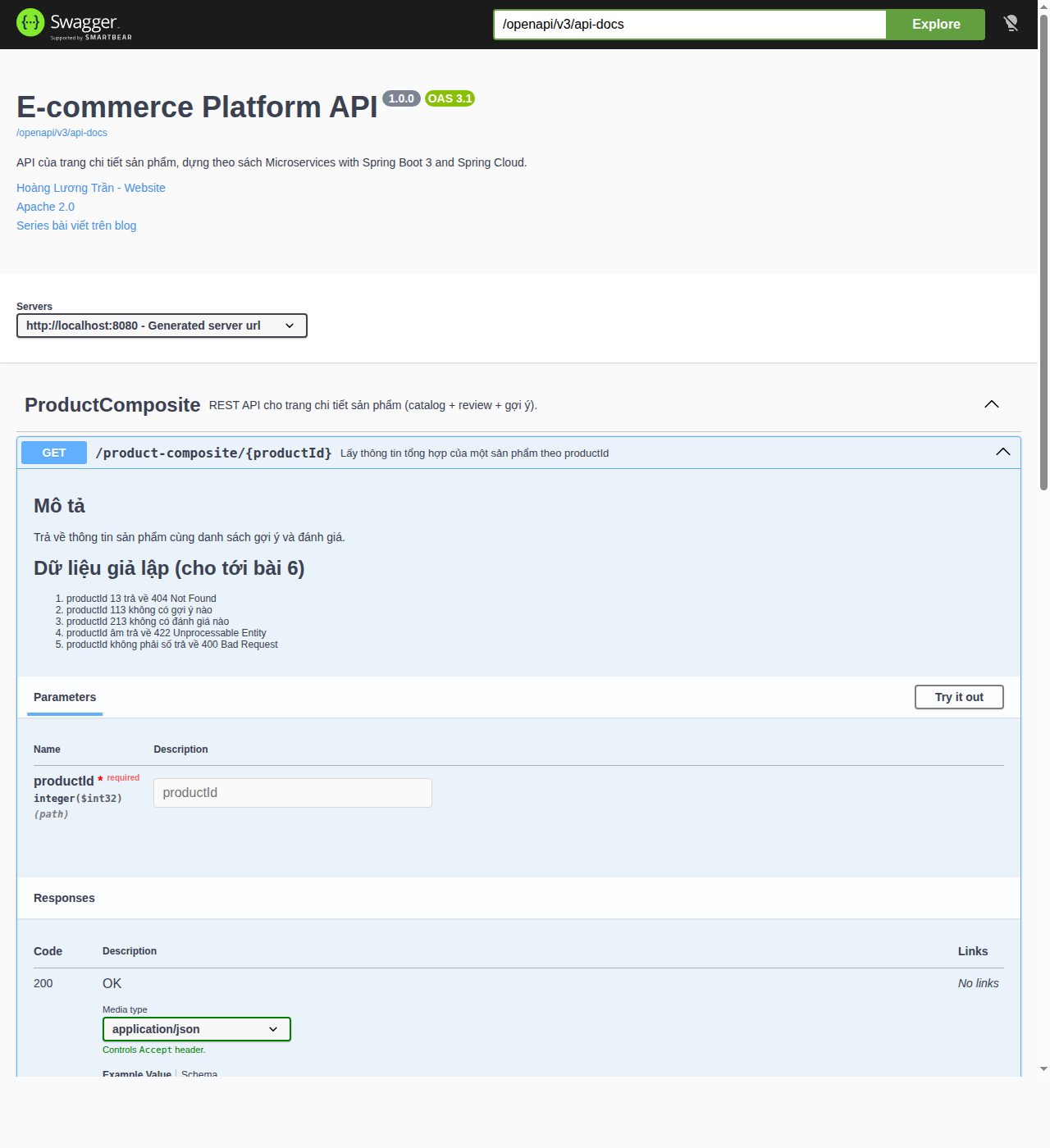
Phần Mô tả và Dữ liệu giả lập chính là đoạn markdown trong notes. Bấm Try it out, nhập productId là 1 rồi Execute: Swagger UI gửi request thật tới composite và hiển thị response. Thử thêm 13, -1 để xem các mã lỗi.
Đặc tả gốc cũng có sẵn để đưa cho công cụ khác (sinh client, import vào Postman):
$ curl -s localhost:8080/openapi/v3/api-docs.yaml | head -20
openapi: 3.1.0
info:
  title: E-commerce Platform API
  description: "API của trang chi tiết sản phẩm, dựng theo sách Microservices with\
    \ Spring Boot 3 and Spring Cloud."
  contact:
    name: Hoàng Lương Trần
    url: https://hoangluongtran.dev/
  license:
    name: Apache 2.0
    url: https://www.apache.org/licenses/LICENSE-2.0
  version: 1.0.0
externalDocs:
  description: Series bài viết trên blog
  url: https://hoangluongtran.dev/
servers:
- url: http://localhost:8080
  description: Generated server url
tags:
- name: ProductComposite
description: REST API cho trang chi tiết sản phẩm (catalog + review + gợi ý).|
Ghi chú
|
Chỗ khác sách: sách dùng springdoc 2.0.2 và sinh đặc tả OpenAPI 3.0. Từ springdoc 2.8 (đi với Spring Boot 3.4 trở lên), mặc định là OpenAPI 3.1, nên Swagger UI hiện nhãn |
Thêm vào test end-to-end
Tài liệu cũng là một phần của API, nên mình thêm vài kiểm tra vào cuối test-em-all.bash:
# Swagger UI và tài liệu OpenAPI
assertCurl 302 "curl -s http://$HOST:$PORT/openapi/swagger-ui.html"
assertCurl 200 "curl -sL http://$HOST:$PORT/openapi/swagger-ui.html"
assertCurl 200 "curl -s http://$HOST:$PORT/openapi/swagger-ui/index.html"
assertCurl 200 "curl -s http://$HOST:$PORT/openapi/v3/api-docs"
assertEqual "1.0.0" "$(echo $RESPONSE | jq -r .info.version)"
assertEqual "http://$HOST:$PORT" "$(echo $RESPONSE | jq -r .servers[].url)"
assertCurl 200 "curl -s http://$HOST:$PORT/openapi/v3/api-docs.yaml"
$ ./test-em-all.bash start stop
...
Test OK (HTTP Code: 302)
Test OK (HTTP Code: 200)
Test OK (HTTP Code: 200)
Test OK (HTTP Code: 200)
Test OK (actual value: 1.0.0)
Test OK (actual value: http://localhost:8080)
Test OK (HTTP Code: 200)
We are done, stopping the test environment...
End, all tests OK: Fri Oct 2 06:01:51 UTC 2026Commit:
git add .
git commit -m "Bài 5: OpenAPI và Swagger UI"
git tag blog-05
Nhìn lại phần nền móng
Sau năm bài, ta có:
-
Một Gradle multi-project với cấu hình chung và hai module dùng chung
api,util. -
Bốn microservice trên WebFlux, xử lý lỗi thống nhất, có test tự động.
-
Composite gọi ba service song song, chịu được việc service phụ sập.
-
Cả hệ thống chạy bằng một lệnh
docker compose up, kiểm tra bằngtest-em-all.bash. -
Tài liệu API sinh từ code, đọc và thử được trên Swagger UI.
Điểm yếu lớn nhất bây giờ là mọi dữ liệu đều giả lập: sản phẩm nào cũng tên name-<id>, giá 199.000. Phần 2 của series bắt đầu bằng việc thay chúng bằng dữ liệu thật: MongoDB cho catalog và gợi ý, MySQL cho đánh giá, mỗi service một database riêng, cùng API tạo và xoá sản phẩm qua composite.